發表文章

劉任昌Entry輸入文字變數textvariable字型font

圖片
將OptionMenu改成Entry 將OptionMenu改成Entry完整程式碼 from tkinter import * #從函式庫 tkinter 輸入所有 * 方法 import math #從函式庫 math 輸入所有 * 方法 from time import * from random import * class Regular: def __init__(self, cx, cy, cr, s, t, c, w): #類別共同的設定必然 def __init__ initiate發起 self.cx, self.cy, self.cr = cx, cy, cr #取得中心座標cx, cy, 半徑cr self.s, self.t = s, t #取得邊角數目s,t尖銳程度,取代原來的k = s.get() self.c, self.w = c, w #取得顏色c,寬度w self.u = 2 * math.pi / self.s #使用模組 math 圓周率 pi self.x, self.y = [], [] for i in range( int(self.s * 1.5)): self.x.append(self.cx + self.cr*math.cos(i*self.u)) self.y.append(self.cy + self.cr*math.sin(i*self.u)) def drawLine(self, x0, y0, x1, y1): canvas.create_line(x0, y0, x1, y1, width = self.w, fill=self.c) def draw(self): #類別的方法 secondTime = second.get() #取得輸入的second變數,當作區域變數secondTime for i in range( int(self.s * 1.5) ...

劉任昌類別,必須有 兩底線init兩底線的起始initiate函數

圖片
w3schools練習class class Person: #建立類別,必須有 兩底線init兩底線的起始initiate函數 def __init__(self, name, age): self.name = name self.age = age def myfunc(self): print("靠!我的") print("名字是" + self.name) print("靠!我的\n名字是" + self.name) #字串中\n換列 p1 = Person("劉任昌", 36) p1.myfunc() print("印出p1.name: " + p1.name) w3schools練習class截圖 VS code練習class Stars from tkinter import * #從函式庫 tkinter 輸入所有 * 方法 import math #從函式庫 math 輸入所有 * 方法 from time import * from random import * class Regular: def __init__(self, cx, cy, cr, s, t, c, w): #類別共同的設定必然 def __init__ initiate發起 self.cx, self.cy, self.cr = cx, cy, cr #取得中心座標cx, cy, 半徑cr self.s, self.t = s, t #取得邊角數目s,t尖銳程度,取代原來的k = s.get() self.c, self.w = c, w #取得顏色c,寬度w self.u = 2 * math.pi / self.s #使用模組 math 圓周率 pi self.x, self.y = [], [] for i in range( int(self.s * 1.5)): self.x.append(self.cx + self.cr*math.cos(i*s...

劉任昌python時間函式time.sleep

圖片
from tkinter import * #從函式庫 tkinter 輸入所有 * 方法 from math import * #從函式庫 math 輸入所有 * 方法 from time import * #取代import time class Regular: def __init__(self, cx, cy, cr, s, t, c, w): #類別共同的設定必然 def __init__ initiate發起 self.cx, self.cy, self.cr = cx, cy, cr #取得中心座標cx, cy, 半徑cr self.s, self.t = s, t #取得邊角數目s,t尖銳程度,取代原來的k = s.get() self.c, self.w = c, w #取得顏色c,寬度w self.u = 2 * pi / self.s #使用模組 math 圓周率 pi self.x, self.y = [], [] for i in range( int(self.s * 1.5)): self.x.append(self.cx + self.cr*cos(i*self.u)) self.y.append(self.cy + self.cr*sin(i*self.u)) def draw(self): #類別的方法 for i in range( int(self.s * 1.5) - self.t): canvas.create_line(self.x[i], self.y[i], self.x[i + self.t], self.y[i + self.t], fill = self.c, width = self.w) sleep(0.5) #睡覺一秒,如果import time必須time.sleep(0.5) tk.update() #將視窗...

劉任昌python, input, str, float

圖片
VS code編輯環境截圖 VS code程式碼 from math import * def abc(r): print("劉任昌輸入的半徑 " + str(r)) print("圓面積: "+str(pi*r*r)) print("圓周長: "+str(pi*r*2)) print("球體積: "+str(pi*r*r*r*4/3)) print("球表面積:"+str(pi*r*r*4)) def tri(z): print("劉任昌輸入的度 " + str(y)) print("正弦sin "+str(sin(z))) print("餘弦cos "+str(cos(z))) def group(r, t): abc(r) tri(t) r = float(input("輸入半徑: ")) y = float(input("輸入角度360度單位: ")) t = y/180*pi group(r,t) 說明影片

劉任昌python輸入import數學math函式庫define定義function函數

圖片
from math import * #劉任昌從math輸入所有函式 # import math #劉任昌輸入math函式庫 def abc(r): #定義函數abc print("圓面積: "+str(pi*r*r)) print("圓周長: "+str(pi*r*2)) print("球體積: "+str(pi*r*r*r*4/3)) print("球表面積:"+str(pi*r*r*4)) def tri(z): print("正弦sin "+str(sin(z))) print("餘弦cos "+str(cos(z))) def group(r, t): abc(r) tri(t) r , t = 1, pi/3 #半徑, 60度=pi/3 group(r,t) import math from math import * 心得使用ul=undered list標記語言 輸入函式庫,例如比較 import math from math import all 自訂函數 def 函數名稱() Define Definite當然的 Definition 常常被利用於模組化程式碼 貼到VS Code建立視窗 from math import * #劉任昌從math輸入所有函式 from tkinter import *#從建構視窗函式庫輸入所有函式 # import math #劉任昌輸入math函式庫 def abc(r): #定義函數abc print("圓面積: "+str(pi*r*r)) print("圓周長: "+str(pi*r*2)) print("球體積: "+str(pi*r*r*r*4/3)) print("球表面積:"+str(pi*r*r*4)) def tri(z): print("正弦sin "+str(sin(z))) print("...

劉任昌Python類別class函數function

圖片
VS Code截圖 VS Code程式碼 from tkinter import * #從函式庫 tkinter 輸入所有 * 方法 from math import * #從函式庫 math 輸入所有 * 方法 class Regular: def __init__(self, cx, cy, cr, s, t, c, w): #類別共同的設定 self.cx, self.cy, self.cr = cx, cy, cr #取得中心座標cx, cy, 半徑cr self.s, self.t = s, t #取得邊角數目s,t尖銳程度,取代原來的k = s.get() self.c, self.w = c, w #取得顏色c,寬度w self.u = 2 * pi / self.s #使用模組 math 圓周率 pi self.x, self.y = [], [] for i in range( int(self.s * 1.5)): self.x.append(self.cx + self.cr*cos(i*self.u)) self.y.append(self.cy + self.cr*sin(i*self.u)) def draw(self): #類別的方法 for i in range( int(self.s * 1.5) - self.t): canvas.create_line(self.x[i], self.y[i], self.x[i + self.t], self.y[i + self.t], fill = self.c, width = self.w) def show(): #畫圖方法 poly = Regular(cx.get(), cy.get(), cr.get(), s.get(), t.get(), c.get(), w.get()) polyList.append(...

劉任昌VSCode自訂方法canvas.delete('all')建構Button

圖片
微軟VS Code編輯環境與執行結果 程式碼 #原來240單元程式碼如下 from tkinter import * #從函式庫 tkinter 輸入所有 * 方法 from math import * #從函式庫 math 輸入所有 * 方法 t = (3,4,5,6,7,8,9,10,11,12,16,20)#宣告一元組tuple(...) tk = Tk() tk.title("劉任昌視窗使用者介面GUI") canvas = Canvas(tk, width=800, height=500) #建立視窗 canvas.pack() def show(event): #定義由事件event(按鈕選單)呼叫的函數show cx, cy, cr = 110, 210, 100 #宣告圓中心座標cx, cy半徑cr x, y =[],[] #宣告二陣列[...] k = s.get() #取得 ge t按鈕選單的選擇變數 u = 2 * pi / k #使用模組 math 圓周率 pi for i in range(k+1): x.append(cx + cr*cos(i*u)) #加入陣列的元素 y.append(cy + cr*sin(i*u)) #使用模組 math 三角函數cos, sin for i in range(k): canvas.create_line(x[i], y[i], x[i+1], y[i+1]) canvas.create_line(x[k-1], y[k-1], x[0], y[0], fill="blue", width=5) #可考慮增加width寬度,fill顏色 def diagonal(): cx, cy, cr = 410, 210, 100 #宣告圓中心座標cx, cy半徑cr x, y =[],[] ...

劉任昌期中考VS Code編輯Python圖形使用者介面GUI

圖片
期中考複習 ' 劉任昌集合{},字典{key:value,},元組(),清單或陣列[]' p = ("台積電", "鴻海", "聯發科") r = {"台積電", "鴻海", "聯發科"} s = ["台積電", "鴻海", "聯發科"] t = ["中華電", "台塑化", "台達電"] d= {2330:"台積電",2317:"鴻海",2454:"聯發科"} u = s v = s.copy() s.extend(t) #原來的 s=s.extend(t)是錯誤 i = 0 for a in r: #然後嘗試取代p為s(產生六個),r(產生三個) i = i+1 print("台灣第" + str(i) + "大的公司是") print(" " + a) 影片239 w3schools期中考截圖 微軟VS Code編輯tkinter圖形使用者介面 影片240 VS Code截圖 VS Code程式碼 #劉任昌改顏色blue, purple, 元組t 增加,32 from tkinter import * #從函式庫 tkinter 輸入所有 * 方法 from math import * #從函式庫 math 輸入所有 * 方法 t = (3,4,5,6,7,8,9,10,11,12,16,20,32) #宣告一元組tuple(...) tk = Tk() tk.title("劉任昌視窗使用者介面GUI") canvas = Canvas(tk, width=500, height=500) canvas.pack() def show(event): #定義由事件event(按鈕選單)呼叫的函數show cx, cy, cr = 210, 210, 200 ...

劉任昌python陣列array

圖片
w3schools陣列截圖 w3schools陣列程式碼 #劉任昌拷貝自 201單元 """for x in 'Takming': #迴圈逐字元印出 print("字母: %s" % x)三引號框起註解 """ fruits = ['台積電', '鴻海', '聯發科'] #台灣市場價值最高的三公司 for x in fruits: # print ("公司: %s" % x) print(fruits) fruits.append("中華電") print("使用append") print(fruits) fruits.clear() print("使用clear") print(fruits) fruits = ['台積電', '鴻海', '聯發科', '中華電'] chicken = fruits.copy() #和 chicken = fruits 有何不同? print(chicken) fruits.append("中華電") print(fruits.count("中華電")) print(fruits.count("台積電")) for x in fruits: print(x) if x == "中華電": #判斷式是否banana print('I hate 中華電.') if x == "聯發科": #判斷式是否cherry print('I like cherry.') if x == "鴻海": #判斷式是否apple print('You are my sweet apple.') #體會到只要我有耐心與興趣,我也可以當一個專業的程式開發人員 w3schools陣列方法Array Methods Pyt...

劉任昌Python集合set清單list元組tuple字典dictionary

圖片
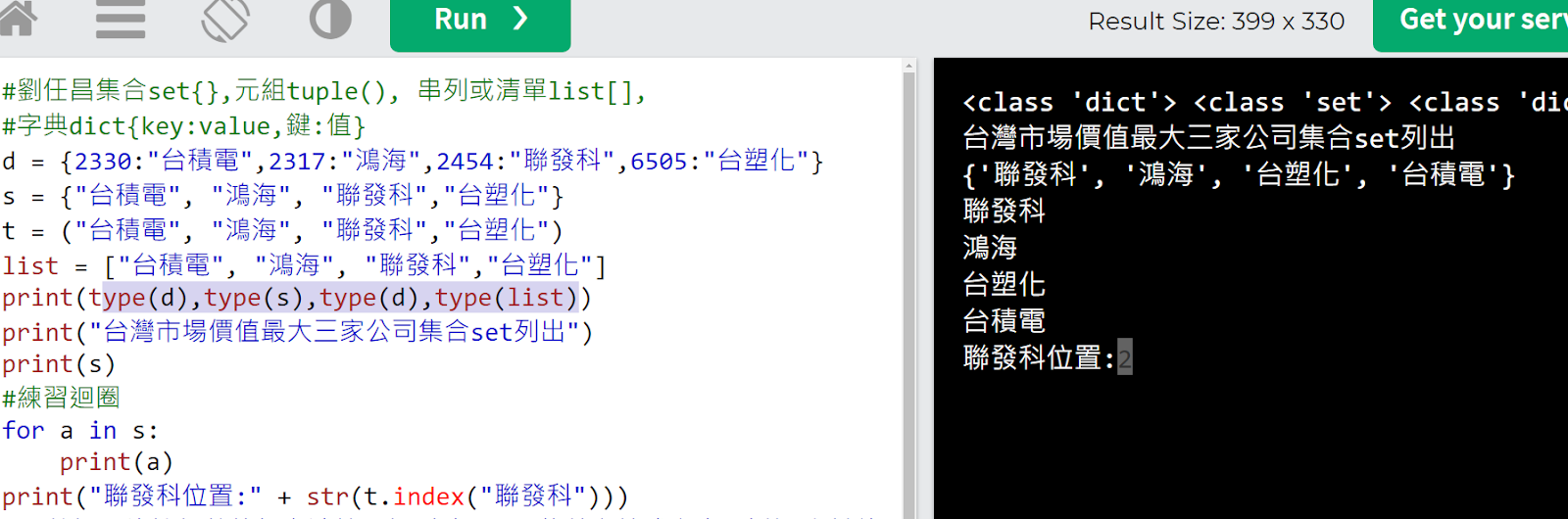
w3schools練習截圖 w3schools程式碼 #劉任昌集合set{},元組tuple(), 串列或清單list[], #字典dict{key:value,鍵:值} d = {2330:"台積電",2317:"鴻海",2454:"聯發科",6505:"台塑化"} s = {"台積電", "鴻海", "聯發科","台塑化"} t = ("台積電", "鴻海", "聯發科","台塑化") list = ["台積電", "鴻海", "聯發科","台塑化"] print(type(d),type(s),type(d),type(list)) print("台灣市場價值最大三家公司集合set列出") print(s) #練習迴圈 for a in s: print(a) print("聯發科位置:" + str(t.index("聯發科"))) """整個區塊註解前後加上連續三個引號, str將數字轉成字串 才能 和其他字串相接the set list is unordered, meaning: the items will appear in a random order. # Refresh this page to see the change in the result. """ w3schools集合方法 Python has a set of built-in methods that you can use on sets. Method Description add() Adds an element to the set clear() Removes all the elements from the set copy() Returns a copy of the set differenc...

劉任昌Python字典Dictionaries

圖片
w3scholls截圖 w3scholls練習程式碼 #字典 keys:values, 劉任昌 #w3schools原來 字串:字串,改成 整數:字串 a = { #市場價值最大的五家公司 2330: "台積電", 2317: "鴻海", 2454: "聯發科", 2412: "中華電", 6505: "台塑化" } print(a) print(a[6505]) print(a.get(2330))#功能同 a[2330] print(a.keys()) #keys()方法列出key搜尋鍵 print(a.values()) #keys()方法列出values值 b = a.copy() print("列出b " + str(b)) print(b[2317]) print(b.clear()) a.update({2308: "台達電"}) print(a.values()) print("用迴圈列出字典a的所有值") for t in a: print(a[t]) 字典方法Dictionary Methods Python has a set of built-in methods that you can use on dictionaries. Method Description clear() Removes all the elements from the dictionary copy() Returns a copy of the dictionary fromkeys() Returns a dictionary with the specified keys and value get() Returns the value of the specified key items() Returns a list containing a tuple for each key value pair keys() Returns a list containing the dictionary's keys pop() ...

劉任昌SVG與CANVAS

圖片
w3schools練習SVG w3schools練習canvas 心得 canvas帆布 教學影片 維基百科SVG 維基百科canvas

劉任昌w3schools字串str, format, slicing[::]

圖片
w3schools 程式碼 #劉任昌strings可以用單引雙引只要對稱 b = '狗吃屎,兔吃菜,貓抓鼠,劉任昌很帥' # 0 1 23 4 5 678 9 10,11,12, print('字串長度' + str(len(b))) #len函數 字串長度 輸出 整數 #str函數 轉成字串 這樣才能串接 print(b[-5:-2]) #練習字串格式format quantity = "精華下午茶" itemno = 5 price = "劉任昌" myorder = "我要吃 {} 吃幾個 {},和 {} 誰一起吃" print(myorder.format(quantity, itemno, price))

劉任昌w3schools字串切割slicing

圖片
b = "貓抓鼠,狗吃屎,兔吃土" # 0 1 2 3 4 5 6 7 8 9 10 # -5 -4 -3 -2 -1 print('劉任昌w3schools字串切割slicing') print('第-5至-2:'+b[-5:-2]) print('第 6至 9:'+b[6:9]) print('整個顛倒:'+b[::-1])

劉任昌python,print,input,字串[::-1]

圖片
程式碼 #劉任昌的第一個python程式2023/2/20 print("你在跟我哈啦嗎?") #python輸出比Java簡單太多 a = "你在跟我哈啦,狗吃屎" #python指令結尾不需要;分號 b = '貓抓鼠,師父開撈駛來時' #phthon字串單引雙引號都可 print(a) print(b) c = a[1:5:] #取字串a的第1到5(不含),從0開始 print(c) c = a[::-1] print(c) a = input("自己輸入字串:") print("你輸入:"+a) print("反過來:"+a[::-1]) 心得 Java輸出System.out.println();

劉任昌對照Python與JavaScript指令

比較Python與JavaScript指令 for x in range(20): #x整數, str方法 a = "" #python用縮排取代{ }當作區段 for y in range(x): a += str(y) print("第" + str(x) +"列:" + a) # Java, C靜態變數,必須先宣告變數 # Python, JavaScript允許動態變數,可以不用先宣告 Javascript程式碼:不執行,看程式碼,必須在撰寫模式貼上 <h1>HTML與JavaScript</h1> <div id="show"></div> <script> var a = "劉任昌會Python與JavaScript<br>"; for (var x=0; x<10; x++) { /*JavaScript註解Python縮排分區段,{}*/ a +="第" + x +"列:" for (var y=0; y < x; y++) a += y; a += "<br>"; } document.getElementById("show").innerHTML = a; </script> HTML與JavaScript

劉任昌JavaScript輸出與輸入的程式碼

圖片
JavaScript輸出與輸入的程式碼 輸入字串: JavaScript程式碼 <p>輸入字串:<input type="text" len="50" id="in"></p> <p><input type="button" value="執行JavaScript" onclick="f()"></p> <p id="out"></p> <script> function f(){ var a = document.getElementById("in").value;/*取得id=in的文字*/ var b = "原字串: "+a+"<br>長度是:"+a.length+"<br>反串是: "; var c = ""; for (var i = 0; i < a.length; i++) c = a.slice(i,i+1) + c; b = b +"<font size=7>" +c + "</font>"; document.getElementById("out").innerHTML = b;/*輸出html指令*/ } </script> 196影片

劉任昌JavaScript,input,text,getElementById.

圖片
JavaScript輸出與輸入 輸入字串: JavaScript輸出與輸入的程式碼 <p>輸入字串:<input type="text" len="50" id="in"></p> <p><input type="button" value="執行JavaScript" onclick="f()"></p> <p id="out"></p> <script> function f(){   var a = document.getElementById("in").value;/*取得id=in的文字*/   var b = "原字串: "+a+"<br>長度是:"+a.length+"<br>反串是: ";   var c = "";   for (var i = 0; i < a.length; i++)      c = a.slice(i,i+1) + c;    b = b +"<font size=7>" +c + "</font>";   document.getElementById("out").innerHTML = b;/*輸出html指令*/ } </script> 劉任昌196上課影片

劉任昌Java套件Scanner,方法length(),charAt()

圖片
Java程式碼 import java.util.Scanner; /*開啟套件package util=utility用途,Scanner掃描器*/ /*蔡英文utility industry=公用事業產業,電力,自來水,效用=utility */ class MyClass { public static void main(String[] args) { String a, b=""; /*定義字串a,b */ Scanner myObj = new Scanner(System.in); /*建構掃描物件*/ System.out.print("輸入: "); a = myObj.nextLine(); /*輸入文字nextLine到變數a */ System.out.println("長度: " + a.length());/*輸出字串長度length() */ for (int i = 0; i < a.length(); i++) /*迴圈 */ b = a.charAt(i) + b; /*a字元順序放到b前面*/ System.out.println("輸出: "+ b); } } Visual Studio Code程式開發環境 Java類別Classes/物件Objects 每一個類別或物件,包含屬性attributes與方法method。 JavaScript將輸入的字串顛倒輸出 輸入字串: JavaScript將輸入的字串顛倒輸出程式碼 <p>輸入字串:<input type="text" len="50" id="in"></p> <p><input type="button" value="執行JavaScript" onclick="f(...

劉任昌Java內建方法length(),charAt()

圖片
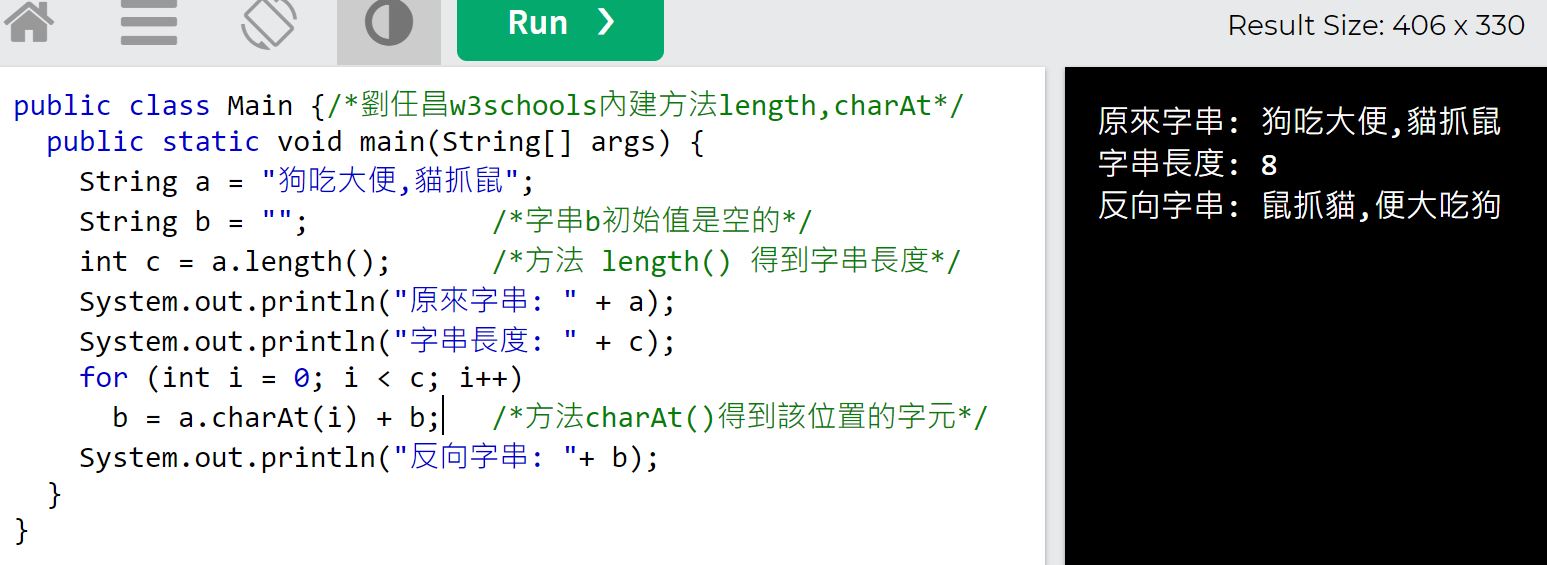
w3schools編寫Java程式語言 微軟VS Code編寫Java程式語言 Java程式語言 public class Main {/*劉任昌w3schools內建方法length,charAt*/ public static void main(String[] args) { String a = "狗吃大便,貓抓鼠"; String b = ""; /*字串b初始值是空的*/ int c = a.length(); /*方法 length() 得到字串長度*/ System.out.println("原來字串: " + a); System.out.println("字串長度: " + c); for (int i = 0; i 下次上課Java程式語言 import java.util.Scanner; // Import the Scanner class class MyClass { public static void main(String[] args) { String a, b=""; Scanner myObj = new Scanner(System.in); // Create a Scanner object System.out.print("輸入: "); a = myObj.nextLine(); // Read user input for (int i = 0; i